Create your CubeMars account

In the field of robotics and intelligent manufacturing, actuators often determine not whether a robot "can run", but "where the performance limit lies".With the continuous development of robotics technology, the importance of actuators is also increasing. In recent years, CubeMars has gradually gained widespread attention from engineers and R&D teams due to its high-performance actuator products, and has been applied in various scenarios such as quadruped robots, humanoid robots, exoskeletons, industrial automation, and unmanned systems.
The core advantage of CubeMars actuators lies in their high integration of motor, drive, and control, while combining high torque density with flexible control capabilities. This not only significantly reduces the difficulty of system integration but also allows developers to achieve higher-performance robotic systems in a shorter time.
If you have already purchased a CubeMars actuator but are still unsure how to use it, you can directly refer to the "How to Use CubeMars Actuators" section in this article to quickly get started with practical operations.
If you are not yet familiar with actuators or CubeMars products, you can start here. We will proceed from basic concepts to practical applications. But before we officially begin, one question is worth considering:
What exactly is a CubeMars actuator? What is its essential difference from traditional motors? And how should it be used correctly in actual projects?
Before diving into the specific structure, we can first understand the CubeMars actuator as a whole. Unlike traditional motors, it is not a single power output component, but a "joint-level solution" that integrates drive, control, and actuation functions, specifically designed for the complex motion needs of robotic systems.
This is the essential difference from traditional motors.
Based on this, let's look at its composition and technical features.
In a traditional system, a drive unit typically includes:
Motor
Gearbox
Driver
This separate structure requires developers to match and debug components themselves, resulting in high development complexity and high debugging costs.
Compared to traditional solutions, CubeMars actuators offer significant improvements in performance and user experience through integrated design.
| Capability Dimension | Technical Performance | Practical Significance |
| Integration Level | Motor+Drive+Control Integrated | Significantly reduces development difficulty |
| Torque Density | Small size, high output | Significantly reduces development difficulty |
| Response Performance | Low latency | Supports high-dynamic motion |
| Backdrivability | Reversible drive | Enables torque control |
| Control Modes | Multiple modes | Adapts to various application scenarios |
It can be understood as:
A traditional motor is a "power component", while a CubeMars actuator is a "functional joint".
From a system perspective, there are clear differences in structure and application logic between the two solutions.
| Comparison Item | Traditional Solution | CubeMars Actuator |
| Structure | Separate components | Integrated design |
| Debugging Difficulty | High | Significantly reduced |
| Control Performance | Depends on integration | Natively optimized |
| Response Speed | Moderate | Faster and more stable |
After understanding the basic concepts, it is necessary to further distinguish between different types of actuators and select models based on practical applications. This step is crucial for subsequent system design and performance realization. Different types of actuators vary in structural design, reduction methods, and control characteristics, making them suitable for different engineering scenarios.
From a product perspective, CubeMars actuators can be mainly divided into the following two categories:
1. Integrated Joint Actuators (AK Series)
Integrated joint actuators (AK Series) highly integrate the motor, reducer, and drive control system, providing a complete joint module that can be directly applied in robotic systems.
Main Features:
| Feature | Description |
| High Integration | Motor + Drive + Control integrated |
| Easy Installation | Can be directly used as a robot joint |
| Simple Debugging | Significantly reduces system integration difficulty |
Typical Models and Applications:
AK60-6 V3.0 KV80 → Small robotic arms / Lightweight robots
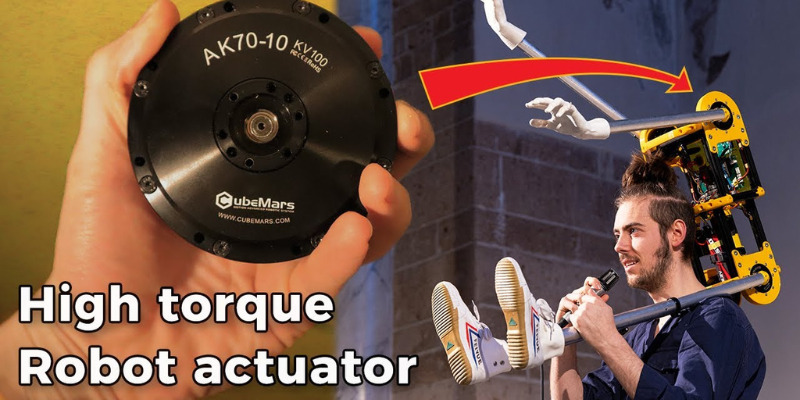
AK70-10 KV100 → Quadruped robot joint systems
AK80-8 KV60 → Humanoid robots / Exoskeleton systems
AK10-9 V3.0 KV60 → High-load dynamic systems
Suitable for: Robotic systems requiring high dynamic performance and a certain level of integration
2. QDD Quasi-Direct Drive Actuators (AKE Series)
QDD (Quasi Direct Drive) actuators (AKE Series) adopt a low reduction ratio design, balancing dynamic performance and control precision between direct drive and traditional reduction systems.
Main Features:
| Feature | Description |
| Fast Response | Low latency, suitable for dynamic motion control |
| High Backdrivability | Supports torque control and compliant interaction |
| High Control Precision | Smoother and more natural movements |
Typical Models and Applications:
AKE60-8 KV80 → Small robots / Lightweight systems
AKE80-8 KV30 → Industrial robot joints
AKE90-8 KV35 → Medium-to-high load industrial systems
Suitable for: Industrial and engineering scenarios requiring stable output and structural reliability
3. Model Selection Logic (Core Method)
In practical engineering, actuator selection typically follows this logic:
Lightweight / Small robots → AK60-6 V3.0 KV80 / AKE60-8 KV80
Quadruped robots → AK70-10 KV100
Humanoid robots / Exoskeletons → AK80-8 KV60
High-load / High-power systems → AK10-9 V3.0 KV60 or AKE90-8 KV35
Industrial stability systems → AKE80-8 KV30 / AKE90-8 KV35
Suitable for robotic systems with high requirements for dynamic performance and control precision
3. Model Selection Logic (Core Method)
In practical engineering applications, actuator selection typically follows this logic:
Lightweight / Small robots → AK60-6 V3.0 KV80 / AKE60-8 KV80
Quadruped robots → AK70-10 KV100
Humanoid robots / Exoskeletons → AK80-8 KV60
High-load / High-power systems → AK10-9 V3.0 KV60 or AKE90-8 KV35
Industrial stability systems → AKE80-8 KV30 / AKE90-8 KV35
Essentially, selection is a balance between "dynamic performance, output torque, and system structural complexity".
Compared to parameter and structure descriptions, real-world applications better demonstrate the practical value of actuators. The following cases come from actual projects, representing three typical directions: entertainment, service, and research.
Daniel Simu is a creator focused on robotic art and performance. He showcased a highly coordinated robot performance system on the America's Got Talent stage.
In this scenario, the robot needed to complete precisely synchronized dance moves and complex choreography, placing high demands on the actuators:
Movements must be smooth and natural, without stuttering
Multiple joints require high synchronization
Very sensitive to control latency
In this project, CubeMars actuators provided stable dynamic response and high-precision control capabilities, enabling the robot to perform complex and expressive movements.
Core embodiment: High dynamics + High coordination control capability
In the field of rehabilitation and assisted mobility, traditional manual wheelchairs have limitations in long-term use, complex terrains, and high-load scenarios. With the development of motor and control technology, electric wheelchairs are gradually moving towards intelligent and customized directions.
In this CubeMars case, developers built a customized electric wheelchair system based on a dual-motor drive solution to enhance users' mobility and experience.
Project Background and System Design
This project adopted a typical dual-motor differential drive structure, where the left and right wheels are independently driven by separate actuators, achieving steering and control through speed differences.
The main system components include:
Main control system (based on ESP32)
Independent drive actuators for left and right wheels
Power system (custom battery pack)
Mechanical structure (foldable frame)
This structure is widely used in mobile robots, featuring simple construction and stable control.
Practical Application Requirements
Compared to industrial equipment, this type of application places more emphasis on "user experience" and "safety", imposing different requirements on the actuators:
Smooth start and stop processes, avoiding sudden changes
Stable low-speed control for fine operations
Sufficient torque to handle slopes and complex road surfaces
Stable system operation for daily reliability
Essentially, this is a "human-interactive power system", not just a drive device.
Role of the Actuator in the System
In this project, the actuator was not only responsible for power output but also directly affected the overall handling performance:
High torque output → Supports starting and climbing ability
High control precision → Enables smooth acceleration and precise steering
High efficiency → Improves overall system endurance
Stable communication capability → Ensures reliable control system operation
The performance of the actuator directly determines the comfort and safety of the wheelchair.
Binghamton Robotics participated in the internationally renowned University Rover Challenge (URC), which requires teams to design mobile robot systems capable of performing tasks in complex Mars simulation environments.
During the competition, the robot needed to complete:
Irregular terrain navigation
Fine manipulation with a robotic arm
Multi-task coordination
This placed comprehensive demands on the actuators:
High control precision
Fast response speed
Stable and reliable system
CubeMars actuators provided stable power and precise control support for the robot in this project, enabling it to maintain reliable operation under complex terrain and high-load tasks, helping the team achieve good results in the competition.
Core embodiment: High precision + High performance + System stability
What Can We See from the Cases?
Through the three real-world applications in different fields, we can see that CubeMars actuators demonstrate different advantages in different scenarios:
Entertainment robots → Emphasize dynamic performance and control smoothness
Industrial robots → Emphasize stability and safety
Research projects → Emphasize precision and system reliability
The same actuator system can cover completely different application requirements.
Through these real-world cases, we can see that CubeMars actuators have been validated in multiple fields:
This indicates that they not only have technical advantages but also mature engineering implementation capabilities, rather than being merely laboratory-stage products.
After understanding the actuator types, selection becomes a key step in determining system performance. A reasonable selection not only affects whether the robot "can move", but also determines "how well it moves" and how smoothly the development process goes.
Rather than simply comparing parameters, a more effective approach is to make a comprehensive judgment from four levels: application requirements → key indicators → structural constraints → control capabilities.
1. Define the Application Scenario (Top Priority)
Different applications have very different requirements for actuators. The first step in selection must start from the scenario.
| Application Type | Core Requirements | Recommended Direction |
| Quadruped Robots | High dynamics + Lightweight | QDD actuators (AKE Series) |
| Humanoid Robots | Multi-joint coordination + Precision | Medium-high torque QDD |
| Exoskeletons | Backdrivability + Safety | Low reduction ratio actuators |
| Industrial Equipment | Stability + Continuous operation | AKE or high reduction ratio |
| Robotic Arms | Precision + Repeatability | Integrated joint actuators |
Conclusion: First determine "what it will be used for", then consider "which model to use".
2. Matching Key Performance Parameters
After defining the scenario, you need to focus on the following core parameters, which directly determine whether the actuator is "sufficient".
| Parameter | Meaning | Selection Advice |
| Peak Torque | Output capability | ≥ 1.5--2 times actual requirement |
| Continuous Torque | Long-term working capability | ≥ 1.5--2 times actual requirement |
| Speed Range | Motion speed capability | Match motion frequency |
| Reduction Ratio | Power and speed balance | Low reduction ratio for dynamic systems |
| Weight/Size | Structural fit | Prioritize lightweight for mobile systems |
Torque and weight are the two highest priority parameters.
3. Control Capability and System Matching
In a robotic system, the actuator is not only a power source but also a control unit.
| Control Capability | Importance |
| Torque Control | ⭐⭐⭐⭐⭐ (Core capability) |
| Position Control | ⭐⭐⭐⭐ |
| Speed Control | ⭐⭐⭐ |
Actuator selection is essentially a "system-level decision", not a simple parameter choice.
A good selection plan should simultaneously satisfy:
Sufficient performance
Achievable control
Installable structure
Expandable system
If the selection is done right, subsequent development will be much easier; if wrong, costs will multiply in later stages.
CubeMars actuators are integrated intelligent drive modules designed for robot joints and high-dynamic systems. They integrate the traditionally separate "motor + reducer + driver + encoder" into a compact structure, significantly reducing system integration difficulty while improving overall performance and reliability.
From an engineering perspective, it is not just a motor component but a complete joint power solution that can be directly used to build robotic motion systems.
1. Understanding the Purpose of the Actuator Upper Computer
The main purposes of the actuator upper computer include:
Parameter Setting and Modification: The most core function of the upper computer is to allow users to make various settings to the motor and modify its operating parameters according to actual needs.
Issuing Control Commands: Users input desired control signals on the upper computer, which are then "translated" by a debugging tool (such as R-link) into instructions that the motor driver board can recognize and execute.
Configuration via Serial Port: In the system, the upper computer is typically used with Serial Communication, specifically responsible for adjusting motor parameters and system settings.
Monitoring and Debugging: As part of the debugging tool, it helps users configure the motor from "scratch", ensuring it operates according to the intended actions and plan.
Workflow brief: The user operates the upper computer software on the PC, the signal is transmitted via USB to the debugging tool (translator), which then sends the instructions to the motor's driver board through a communication cable (e.g., serial cable), ultimately achieving motor control.
2. How to Download the Actuator Upper Computer
The actuator upper computer is provided by CubeMars. There are two main ways to obtain it. It is recommended to use the official website channel first to ensure version compatibility and stability.
Download Method 1: Product Details Page (Recommended)
1. Open the CubeMars Official Website
2. Go to the official website homepage, enter the Product Center. Select the actuator model you purchased
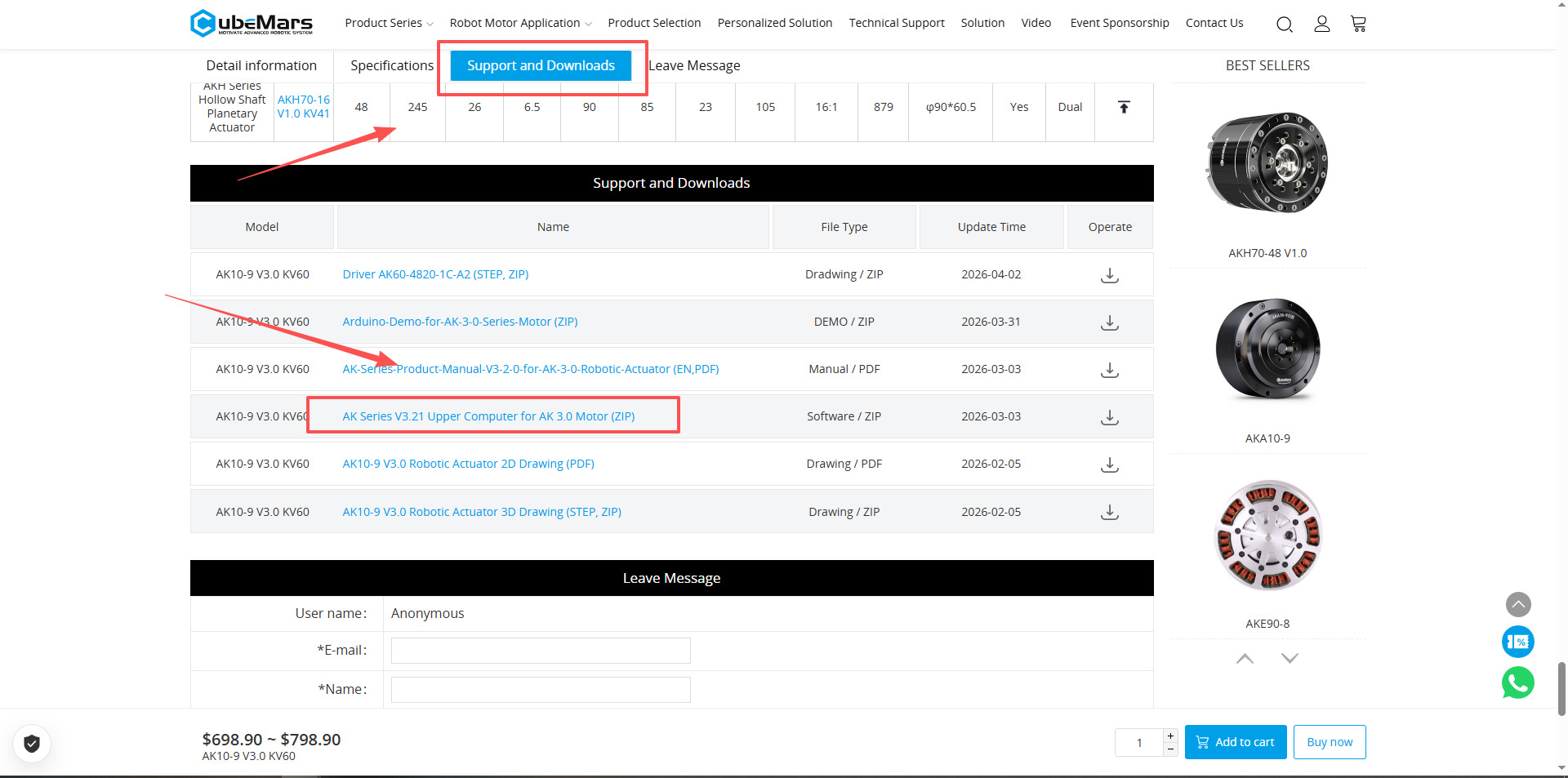
3. Based on the actual series (e.g., AK / AKE, etc.), go to the corresponding product details page.Find the "Technical & Download" section (usually at the bottom of the page), or scroll down and click the "Support & Download" section to quickly locate it.
At the bottom of the details page or in a related area, go to sections like "Technical / Download / Support" to obtain:
Upper Computer software
Firmware
Manual
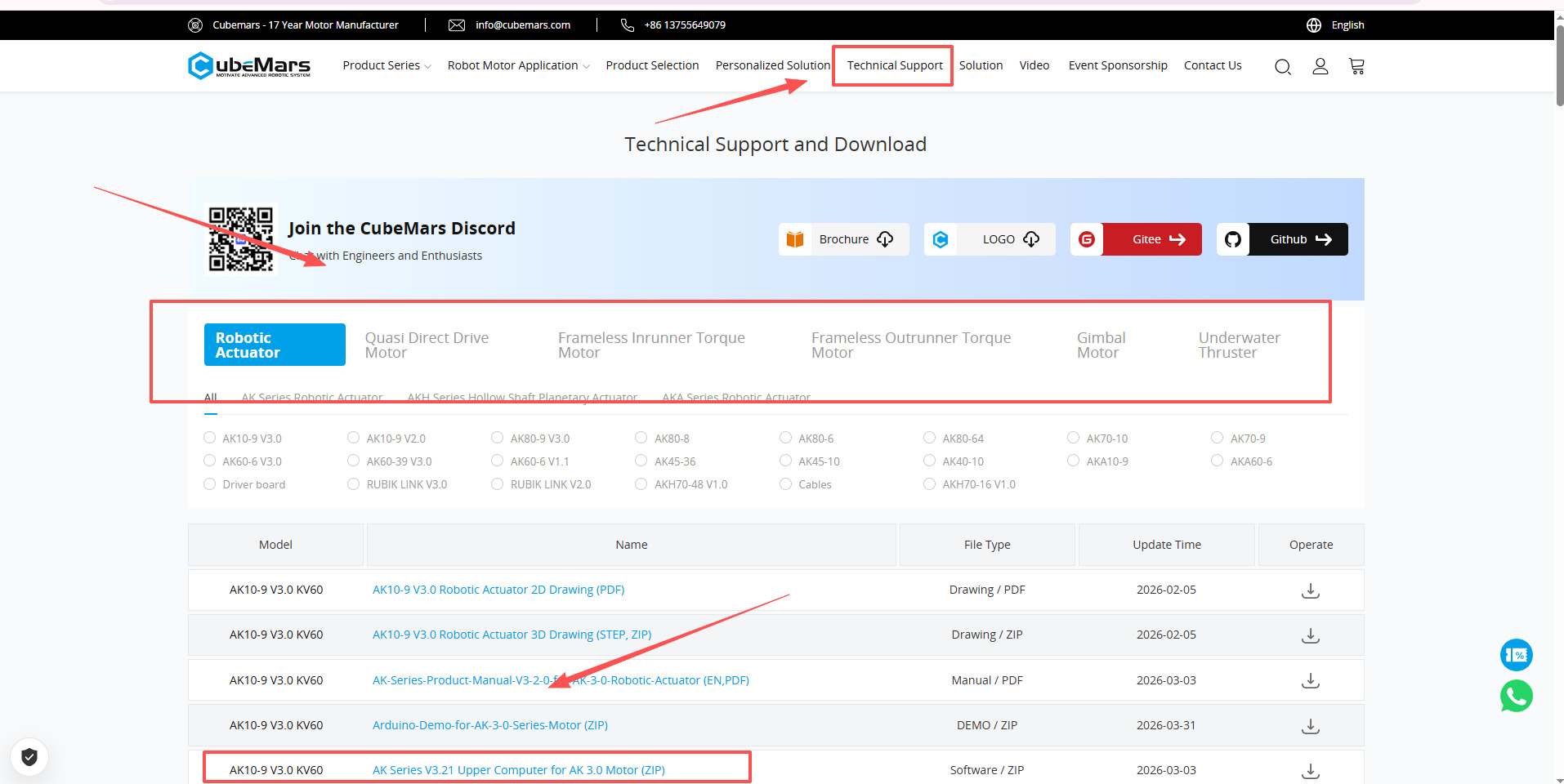
Download Method 2: Technical Support Section (Most Comprehensive)
1. Go to the CubeMars Official Website Homepage
Open the official website and go to the main navigation.
2. Find the "Technical Support" section in the page header
Click to enter the Technical Support or Download Center page.
3. Select the product series and specific model you purchased
Filter the corresponding product based on the actuator type (e.g., AK / AKE, etc.).
4. Download the corresponding upper computer software
Find the appropriate version of the upper computer in the list and select the version matching your model to download.
Workflow Supplement
After downloading, the general steps are:
1. Unzip the software package
2. Open the upper computer program (usually .exe)
3. Connect to the actuator using the RUBIK LINK before use
The upper computer requires a communication module; otherwise, the device cannot be recognized.
一、 Introduction to the AK V2.0 Actuator Upper Computer Basic Interface
1. Core Operation Principle: Read before Write
Before modifying any parameters, the principle of "Read before Write" must be followed.
Read Parameters: Used to detect and read the current parameters and settings on the motor driver board and display them on the upper computer interface.
Write Parameters: Saves and writes the parameters currently displayed on the upper computer or modified data to the motor's driver board.Note:You must read the current parameters first before making modifications; otherwise, the default parameters on the driver board may become disordered.
2. Main Function Interface Introduction
The upper computer interface is mainly divided into the following functional areas:
Waveform Display: Real-time plotting of various motor operation data curves, including current, temperature, real-time speed, internal and external encoder positions, high-frequency speed, rotor position deviation, and DQ current. Through visualization, users can more intuitively monitor the motor's operating status.
System Settings: This page is mainly used to protect the driver board and motor. Users can change hardware limits such as voltage, current, power, temperature, duty cycle, etc. Non-professionals are generally not recommended to modify these default limits arbitrarily.
Parameter Settings: Used to adjust the underlying parameters of the driver board, including current loop KP/KI, encoder calibration, maximum/minimum speed and current, speed loop KP/KI/KD, reduction ratio, and encoder calibration settings.
Application Functions: This page is used to set the motor's CAN ID, CAN communication rate, CAN communication interruption settings, and other communication-related configurations.
Import/Export Settings:
Export: Backs up the current parameter settings as files (suffixes .mc_parameters and .app_parameters) to the computer.
Import: Loads a backup file from the computer to the upper computer, used for restoring data or quickly copying the configuration to other motors of the same model.
Mode Switch & Maintenance:
Mode Switch: Supports switching between MIT mode and Servo Mode.
Firmware Update: Upgrades the driver board by loading a firmware file downloaded from the official website.
Restore Factory: Restores the motor to the factory default state.
System Reset: Stops the motor and restarts the system.
If you encounter problems during operation, you can refer to the official tutorial video
二.Servo Mode Introduction
1. Interface Layout and Switching
Before entering Servo Mode in the upper computer software, you must first click "Mode Switch" and ensure it is currently in "Servo Mode". The Servo Mode control panel is divided into two main areas:
Upper part: Used for Dual-loop control.
Lower part: Used for Single-loop control.
2. Dual-Loop Control
The core logic of dual-loop control is to drive the motor with desired acceleration (DESA) and desired speed (DES), ultimately reaching the desired position (DSP).
This mode includes two position range options:
Single Mode: Position range between 0° and 360°, suitable for precise control within a single revolution.
Multi Mode: Position range between -36,000° and 36,000° (approximately 200 revolutions), suitable for scenarios requiring wide-range rotation.
Operation Tip: It is recommended to click "Set Origin" before starting to set the current motor position as zero. To return to zero, you can directly click "Go to Original", and the motor will rotate back to the zero position.
3. Single-Loop Control
Single-loop control offers five different specific control methods, corresponding to the five letters on the panel:
T (Torque loop): The motor outputs a fixed torque.
P (Position loop): Given a specific position value, the motor will rotate to that position.
I (Current loop) (also known as intensity control). Output torque equals Iq × Kt (Kt is the motor constant).
This mode is often used to control the motor's rated speed by controlling the current intensity.
B (Brake current loop): Fixes the motor at the current position. Note: Please pay close attention to the motor temperature when using this function.
D (Duty cycle loop): Similar to square wave drive form.
Through Servo Mode, users can flexibly choose the appropriate control scheme based on application requirements (such as precise position tracking or constant torque output) and use the Waveform Display function of the upper computer to monitor key parameters such as rotor position and speed (RPM).
3. MIT Mode Introduction
MIT Mode has wide applications in legged robots, quadruped dogs, and other fields.
Core Features
Open Source and Professionalism: Designed specifically for robotic power control, particularly suitable for legged robots requiring highly dynamic response.
Control Capability: Unlike Servo Mode which supports dual-loop control, MIT Mode currently can only control one closed loop at a time (i.e., one of position loop, speed loop, or torque loop).
Ease of Operation: Compared to Servo Mode, MIT Mode has a simpler operational logic, making it very suitable for beginners to quickly get started driving the motor.
2. Motion Control Parameters (Motion Control Panel)
In the MIT control panel, users need to input the following key parameters to control the motor:
DSP (Desired Position): Desired position, in radians (rad). 1 rad is approximately 57.3°.
DSS (Desired Speed): Desired speed, in radians per second (rad/s).
DST (Desired Torque): Desired torque.
KP: Used to suppress motor overshoot.
KD: Adjusts the motion stiffness of the motor, can be seen as a parameter for fine-tuning motor behavior.
ID (King ID): The identity number of the motor. When controlling multiple motors, specifying the ID ensures the instruction is sent to the correct motor.
3. Operation Logic: Car Analogy
To facilitate understanding, we can compare the operation process to driving a car with a broken gear shift cable:
Run: Equivalent to inserting the key and starting the engine.
Set Values: Equivalent to shifting gears (e.g., setting desired position, speed, or torque).
Start: Because the "cable is broken", you need to manually click Start to connect the signal line, sending the transmission's instructions to the engine, and the motor then starts moving.
Stop and Exit:
1. Set all values to 0 (return to "park").
2. Click Start again to send the stop signal.
3. Click Exit to turn off the engine and disconnect.
4. Pre-Operation Check Steps
Before formally running MIT Mode, the following two checks must be completed to ensure safety:
1. Zero Check: Ensure all values (DSP, DSS, DST, KP, KD) on the motion control panel are set to 0 (i.e., in "park").
2. Set Origin: Observe the rotor position on the waveform display. If it is not at 0, click "Set Origin" to set the current position as the initial zero point.
3. Three Closed-Loop Demonstration Examples
Position Loop Control: For example, set DSP to 3.14 (approximately 180°), with appropriate KP and KD, the motor will rotate to the specified angle.
Speed Loop Control: Set the desired rad/s value. Users can also modify the reduction ratio and number of pole pairs in the upper computer settings to switch the display unit to the more intuitive RPM.
Torque Loop Control: Apply a displacement torque value. Under no-load conditions, the motor will typically rotate at full speed.
Through MIT Mode, users can achieve precise and flexible dynamic control of the actuator, providing foundational support for robot development.
4. Steps for Flashing Firmware and Calibration
After completing the basic connection, flashing firmware and calibration are important steps to ensure the normal operation and precision stability of the actuator, generally completed through the upper computer.
Firmware Flashing Steps:
1. Connect the actuator to the computer using the RUBIK LINK and open the upper computer
2. Select the correct serial port (COM) and connect the device
3. Enter the "Firmware / Firmware Update" interface
4. Select the firmware file corresponding to the model (pay attention to version matching)
5. Click Download/Upgrade, wait for completion
6. After completion, power cycle or restart the device
Calibration Steps:
1. Ensure the actuator is in a no-load or safe state
2. Enter the "Calibration" interface in the upper computer
3. Perform Zero Position Calibration
4. Perform encoder calibration or limit setting as needed
5. Save parameters and confirm activation
Precautions:
The firmware must match the actuator model, otherwise communication may fail
Avoid external interference during calibration to ensure accuracy
It is recommended to disconnect the load before operation to prevent accidental movement
Simple summary:
Flashing firmware = Updating the system
Calibration = Ensuring accuracy
These two steps are key to stable actuator operation.
1. AK3.0 Actuator Upper Computer Usage Tutorial
一、 Preparation and Connection
1.Hardware Connection:
Connect the motor to the RUBIK LINK V3.0 debugging tool via a communication cable.
Connect the R-Link to the computer PC using a USB cable.
Indicator Status: After powering on, the blue power light on the driver board stays on; under normal conditions, the green and red indicators light up for 2 seconds and then turn off.
2. Software Startup and Connection:
Open the upper computer software and enter the "Connection" module.
Click "Refresh Port", select the correct COM port and baud rate (typically 921600).
Click "Connect Port", a message displaying "Connected to COMX" indicates successful connection.
二、Interface Function Overview
A. Configuration: Includes basic settings, advanced settings, and firmware upgrade.
B. Real-time Status: Displays voltage, current, temperature, speed, angle, and fault information.
C. Real-time Data: Displays real-time waveforms of current (DQ), temperature, speed, position, and duty cycle.
D. Language Switch: Click the top right corner to switch the interface language.
E. Control: Includes Servo Control, MIT Control, and Unit Setting.
G. Stop: Click to immediately stop the motor operation.
三、Core Basic Operations
1. Read before Write: Before rewriting any parameters, you must first click "Read" to prevent other default parameters on the driver board from going wrong.
2. Driver Calibration: Must be performed when reinstalling the driver board, changing wiring order, or updating firmware.
Prerequisite: The motor must be in a no-load state.
Steps: In the basic settings, sequentially perform Read -> Motor Parameter Identification (about 10 seconds) -> Encoder Parameter Identification (about 45 seconds) -> Write.
Warning: The encoder identification process generates heat; avoid performing it multiple times in quick succession.
四、Motion Control Mode Driving
The AK3.0 upper computer achieves seamless switching between servo and force control modes without manual physical switching.
Servo Control:
Multi-turn/Single-turn Mode: Set desired position (multi-turn range ±36000°), speed, and acceleration, then click start.
General Control Loops: Supports position loop (P), speed loop (S), current loop (I), brake mode (B/T), and duty cycle mode (D).
MIT Control:
Input the motor's CAN ID.
Input desired position (des P), desired speed (des S), desired torque (des T), and gain parameters KP, KD.
Click "Run/Start" to drive the motor.
五、 Firmware Update
1、 In the firmware upgrade tab on the configuration page, click "Open" to select the .BIN format firmware file.
2、 Click "Jump to IAP".
3、 Click "Upload", wait for the progress bar to reach 100%.
4、 Click "Jump to APP", wait about 5 seconds.
2. AK3.0 Actuator Firmware Flashing and Calibration
一、 Firmware Update Steps
Before flashing firmware, ensure the motor and computer are properly connected and recognized via the debugging tool (e.g., RUBIK LINK V3.0).
1. Select Firmware: Select the corresponding firmware file from the dropdown list on the upper computer's firmware upgrade interface.
2. Jump to IAP: Click the "Jump to IAP" button.
3. Start Upgrade: Click "Upload" and wait for the progress bar to reach 100%.
4. Jump to APP: After the upgrade is complete, click "Jump to App" and wait about 5 seconds. The motor entering operation mode indicates the update is complete.
二、Actuator Calibration Steps
Core Prerequisite: The entire calibration identification process must be performed in a no-load state; otherwise, parameters may be inaccurate or the motor may be damaged.
STEP 0: Ensure stable power and proper connection. After successfully connecting in the upper computer, enter the system settings page.
STEP 1: Read. Click "Read" until the interface displays "APP configuration updated".
STEP 2: Motor Identification. Click "Motor Identification". The motor will emit a short buzz and begin rotating. Wait about 10 seconds for the motor to stop rotating. A message displaying "KP KI and Observer Gain Application" indicates completion.
STEP 3: Encoder Identification. Click "Encoder Identification". The motor will rotate slowly. Wait about 45 seconds until "Encoder Parameters Applied" is displayed.
STEP 4: Write. Finally, click "Write". "App Configuration Updated" displayed indicates the entire calibration process is complete.
Important Notes:
Heat Risk: The encoder identification process generates significant heat. Do not perform it multiple times in quick succession to avoid a sudden temperature rise in the motor.
Calibration Timing: Only recalibrate when reinstalling the driver board, changing the motor's three-phase wiring order, or updating firmware (motors come pre-calibrated from the factory).
Overall, the core value of CubeMars actuators is not only reflected in individual parameters but in their integrated and system-level capabilities. Compared to traditional separate "motor+drive+reducer" solutions, CubeMars uses highly integrated design to significantly reduce development difficulty, upgrading the actuator from a single power component to a ready-to-use robot joint module.
In terms of product system, CubeMars, through the distinction between integrated joint actuators (AK Series) and QDD quasi-direct drive actuators (AKE Series), covers a wide range of needs from industrial stable applications to high-dynamic robot systems. Differences in torque, response speed, and control capability among different models make them flexibly adaptable for various scenarios such as quadruped robots, humanoid robots, exoskeletons, and automation equipment.
From practical application cases, CubeMars actuators have been validated in entertainment robots, smart devices, research competitions, and other fields. These cases indicate that they not only possess high dynamic performance and high-precision control capabilities but also good system stability and engineering implementation capabilities, enabling continuous and reliable operation in complex environments.
At the usage level, through the upper computer software + RUBIK LINK communication module, developers can complete the entire process from connection and debugging to control, including parameter configuration, mode switching, firmware updates, and calibration. This standardized process significantly lowers the barrier to entry, making actuators easier to quickly integrate into actual projects.
Overall, with the development of the robotics industry, actuators are gradually evolving from "underlying hardware" into standardized functional modules. CubeMars actuators represent this trend. For robotics or automation projects, choosing the right actuator = determining system performance ceiling + development efficiency, and its importance is continuously increasing.