Create your CubeMars account

Answer: Polarity only indicates positive or negative feedback, not the actual rotation direction.
Answer: No, a single R-LINK cannot operate multiple motors at the same time.
Answer: It is not recommended, as one uses isolated CAN, while the other uses non-isolated CAN.
Answer: Serial communication tools can be used as an alternative.
Answer:
· In MIT Mode, the motor can output state values.
· In Servo Mode, this is not possible.
If you require this feature, you can request a custom solution.
Answer: Remove the motor’s back cover and check the silkscreen on the driver board, which indicates the version number.
Answer:
· In V2.0 of the upper computer, check whether the motor is in Servo Mode or MIT Mode.
o In MIT Mode, the motor does not actively send messages, and feedback operates in a request-response manner.
o In Servo Mode, feedback is periodic.
· To troubleshoot further, you can ask for support on Discord, via email, or through our online store platform.
· In V3.0, there is no distinction between Servo Mode and MIT Mode. You can configure the CAN bus for either request-response mode or periodic feedback mode.
Answer:
1. First, ensure that your operation and hardware connections are correct.
2. Check the upper computer interface to confirm that the motor is communicating normally.
3. If the problem persists, try flashing the firmware using ST-Link. For detailed instructions, please ask on Discord.
Answer: We currently have an Arduino CAN test code for MCP2515. If needed, you can ask for it on Discord. The code allows you to freely choose which control mode to use.
Answer: You need to purchase a motor with a dual encoder, such as AK10-9 V2.0 KV60 or AK80-8 KV60 robotic actuator, or request a custom dual-encoder motor.
A: This issue occurs with older firmware versions. Updates the firmware to resolve it. However, it does not affect the normal operation of the motor. The firmware can be downloaded from our official website or Discord.
A: MIT Mode is the short name for the open source control program of the Massachusetts Institute of Technology Robotics Laboratory,which is widely used in quadruped dog applications, it is easy to operate and supports single-loop (torque/speed/position) control.
Servo mode can have more accurate control of motor torque and position compared to MIT mode, so it is more used in applications such as exoskeleton and supports dual-loop control.
Causes and solutions for failure of drive to operate normally
Project | Issues | Solutions |
The drive panel indicate power supply light off | 1. Power supply system, such as the voltage is too high or too low | 1. Check whether the voltage is meet appropriate voltage of the motor |
UART is not available | 1. Drive unpowered 2. Tx rx plug in reverse | 1. Drive powered 2. Reverse the tx rx |
CAN port cannot communicate | 1. CAN port is loosed 2. The order of CAN cable set in error( plug in by 'H L') 3. Cables too long or 120 Ω terminal resistance missed 4. The Porter rate set incorrectly 5. CAN port damaged | 1. Fixed the connector 2. Reverse the cable 3. Use shielded lines, and add the terminal resistance 4. Set the Baud rate to 1M 5. Infinite and infinite resistance of CAN port means that CAN port has been damaged and needs to be returned to the factory for repair |
Module uncontrolled | 1. CAN ID incorrect 2. Motor mode instruction not received | 1. Set the same ID as message shown.See our manual instruction Page 47 2. See our page 47 and enable right code |
Module doesnt work after enable instructions | 1. The two of three parameters have no value in MIT mode 2. The corresponding proportion is not calculated correctly 3. The value given is too low for the motor to launch | 1. Assign single-loop a value and give multiple loop both 0(mandatory) 2. The proportion is calculated according to the linear |
Customer pc-end and drive connection failure | 1. Sample code error. 2. Pc CAN port uncompetible 3. There's electromagnetic interference 4. The quality of power is not high
| 1. See our manual instruction page 48-50 2. Check if the pc CAN port meets the requirements of drive board 3. Power cable and signal cable should go separate 4. Use better quality of power
|
A: In servo mode, the motor can only response extended frame, 29byte.
A: MIT Mode is the short name for the open source control program of the Massachusetts Institute of Technology Robotics Laboratory,which is widely used in quadruped dog applications, it is easy to operate and supports single-loop (torque/speed/position) control.
Servo mode is another motor control mode based on VESC. Servo mode can have more accurate control of motor torque and position compared to MIT mode, so it is more used in applications such as exoskeleton and supports dual-loop control.
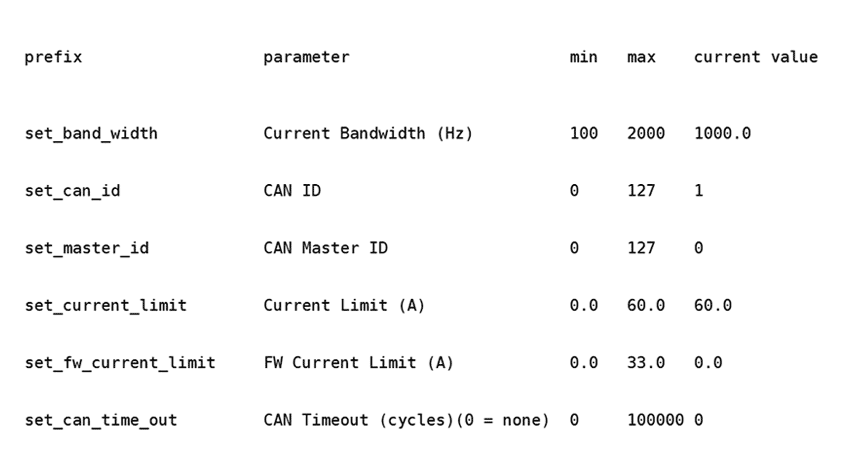
A: We need to use R-LINK to connect with motor and upper computer, in MIT mode, click DEBUG button, then enter setup command, set all the parameters to default as follow pic.